
Potbelly Sandwich Works
Potbelly Sandwich WorksFood & Drink
4.63.06K Reviews
- Version
- 8.11.0
- Installs
- 500.00K
- Age Rating
- Everyone
Screenshots
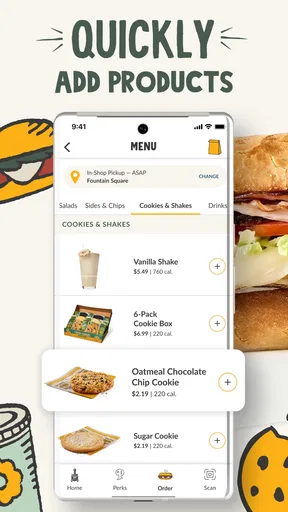
Our Review of Potbelly Sandwich Works
 Analysis by Appyee
I find Potbelly Sandwich Works most useful when I want to order a sandwich without turning a quick lunch into a long conversation at the counter. It is a free Food & Drink app from Potbelly Sandwich Works for arranging pickup or delivery, and it also connects ordering with rewards. After using it, my main impression is that its value depends less on novelty and more on how well it reduces small points of friction: choosing food, checking the order, and getting it to the right place.
That simplicity matters for accessibility. An ordering app should work not only for someone browsing comfortably at home, but also for a person trying to place an order while commuting, dealing with limited dexterity, managing sensory overload, or relying on a larger display. I would not describe every part of the experience as equally easy for every user, but the focused purpose gives it a reasonable foundation. It does one restaurant’s ordering job rather than asking me to compare an entire marketplace.
How the ordering experience supports different users
I look at this section through the practical question of who can comfortably complete an order on a phone and where a little preparation makes the difference. A focused restaurant menu can feel easier to manage than a crowded marketplace, but the best choice still depends on screen access, communication preferences, and the trip to collect the food. The next section considers how those needs play out in ordinary situations.
Readable menus and a focused navigation path
The clearest strength is the narrow scope. Instead of opening a broad delivery marketplace filled with unrelated restaurants, I am working inside one Potbelly menu. That can make the decision process calmer and more predictable, especially for someone who finds crowded screens, competing promotions, or endless scrolling tiring. I can concentrate on the meal, then move toward pickup or delivery without learning a completely different restaurant system.
This also helps people who prefer routine. If I usually order the same sandwich, the app is easier to approach than a general food platform because the destination is obvious: select the restaurant’s food, review the choices, and finish the order. A person who has difficulty remembering multi-step processes may benefit from keeping the same ordering pattern each time. I would still read every customization carefully rather than tapping quickly, since a familiar workflow can encourage mistakes when I stop checking the details.
The app’s public reputation suggests that many people find the basic experience dependable. It holds a 4.6 average from around 35,000 ratings, while the store shows roughly 3,100 written reviews. Those figures do not prove that every screen works equally well for every ability, but they do indicate that the core ordering proposition is landing with a substantial user base. I see that as a reason to try it, not as a guarantee of a friction-free experience.
For readability, I would use the largest comfortable text setting on my phone and keep the display brightness appropriate to the surroundings. Restaurant menus can contain several decisions close together, and increasing text size may make a screen require more scrolling. That is a worthwhile trade-off for many users, but it means checking that buttons and descriptions remain visible rather than assuming the default layout will be ideal.
I also prefer reviewing the complete order before submitting it, particularly when I am ordering for another person. A sandwich order can involve bread, fillings, toppings, sides, drinks, and delivery or pickup details. A clear final check is more important than speed for anyone with reading fatigue, attention difficulties, or a need to verify ingredients carefully. The app is best used as a deliberate checklist, not as a race through the menu.
Touch, vision, and sensory comfort
Touch-based restaurant ordering can be convenient for someone who does not want to explain a complicated meal aloud, but it is not automatically easy for users with tremors, limited reach, or reduced fine-motor control. My practical advice is to place the phone on a stable surface, use one hand to steady it, and make selections slowly. The app’s usefulness in this situation comes from replacing repeated spoken instructions with visible choices, while the remaining challenge is accurate tapping.
That distinction is important. Digital ordering may give a user more privacy and control over a meal, yet a small selection target or a crowded customization screen can still create stress. I would not assume that a person who struggles at a counter will automatically find the app effortless. Someone with motor limitations may still prefer help from a trusted person for the final review, especially if an incorrect choice would be difficult to fix after submission.
For users with visual differences, the best experience will depend on the phone’s own display and assistive settings as well as the app’s layout. I can make the interface more comfortable by choosing a strong contrast setting on the device, enlarging text where possible, and avoiding glare. I would test the menu before relying on it for an important order. If labels become clipped or the sequence becomes confusing after display changes, the app may be less practical than speaking with staff or using another ordering route.
Sensory needs deserve equal attention. A quiet home environment makes browsing easier than a noisy bus, a bright street, or a crowded restaurant entrance. Pickup can reduce time spent in a busy space, but the app cannot control the noise, lighting, queues, or smells at the location itself. Delivery may be more comfortable for someone who finds restaurants overwhelming, although it introduces its own need to monitor arrival information and receive the order.
I also appreciate that digital selection can give me time to think. When I am sensitive to pressure, I would rather inspect the options privately than make rapid decisions while people wait behind me. That is a meaningful accessibility benefit even when no special accessibility tool is involved. The trade-off is that the app still expects me to navigate a visual menu, so it suits users who can comfortably interact with the phone or have assistance available.
Pickup, delivery, and everyday situations
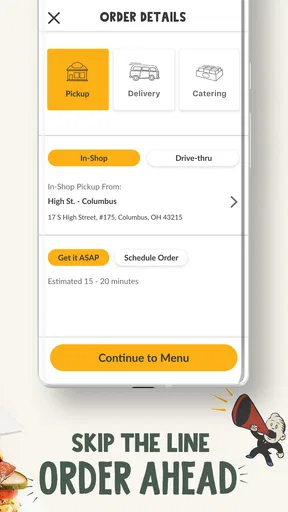
A realistic use case is a workday lunch when I have only a short break and do not want to stand in line. I can arrange the meal before leaving my desk, choose pickup, and spend less time making decisions at the restaurant. For someone with fatigue, anxiety, or difficulty speaking in a busy setting, that preparation can make the whole outing more manageable. It may also help a caregiver organize food for someone else without bringing that person into a crowded location.
Delivery serves a different need. If I am recovering at home, caring for a child, or avoiding a difficult journey, ordering from the app can remove the restaurant visit itself. The important question is not simply whether delivery exists, but whether the user can comfortably enter and review the address, follow the order process, and be available when food arrives. A person with limited mobility may need to plan where the order can be received and whether another household member should collect it.
Pickup is not automatically the most accessible option. It can reduce waiting, but it still requires travel, locating the restaurant, and collecting the food. Someone with mobility limitations should think about the entire route, including parking, entrances, weather, and the distance from the drop-off point. The app can make the ordering stage easier while leaving the physical collection stage unchanged. That is why I see it as one part of an accessible plan rather than a complete solution.
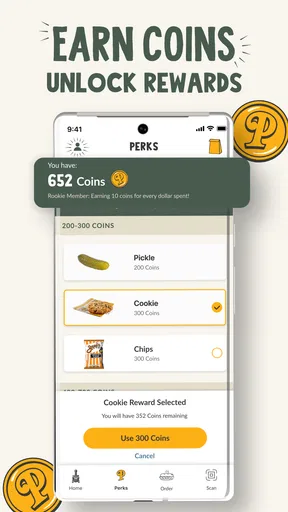
Rewards add another reason to use the restaurant’s own app instead of a general delivery service. In my case, the benefit is strongest when I already choose Potbelly regularly. If I only want to compare nearby restaurants, delivery fees, menus, or dietary choices across several businesses, a marketplace may be more convenient. The dedicated app is a better fit for repeat customers who value a direct routine and want their orders connected to the restaurant’s rewards experience.
The app has been available since March 3, 2014, and its current version is 8.11.0. It supports devices running Android 8.0 or later. That broad age range can be helpful for people who keep a phone longer because replacing hardware is expensive or physically inconvenient. At the same time, an older device may have a smaller screen, slower performance, or limited storage, so the stated operating-system support should not be confused with a promise of identical comfort on every phone.
Where the experience still creates barriers
The biggest limitation is that accessibility is not the same as convenience. The app can move ordering away from a busy counter, but it cannot guarantee that every menu description is equally easy to understand, that every control works perfectly with a device’s assistive technology, or that a restaurant visit will be physically simple. I would test the process with a low-stakes order before depending on it during travel, illness, or a tight schedule.
Another barrier is the amount of information a meal can require. A user with cognitive fatigue may find it difficult to remember which choices have already been made, especially when ordering for several people. My workaround is to decide the meals on paper or in a notes app first, then enter them one at a time. I also pause before payment or final submission to verify names, items, customizations, and the chosen fulfillment method.
That approach takes longer, but it is safer than trying to solve planning and tapping at once. It is particularly useful for a caregiver ordering for a household, a person managing food sensitivities, or anyone who needs another person to approve the final meal. The app supports the transaction; it does not replace the personal checking process that some users need.
There is also a social barrier that digital ordering can hide. If a user needs staff to explain an ingredient, correct an order, or accommodate a situation at pickup, the app may not provide the same immediate human interaction as ordering in person. Conversely, some users will find that direct conversation is the barrier, not the solution. I would choose the channel that matches the individual’s communication needs rather than treating online ordering as universally superior.
For users who depend heavily on screen readers, voice control, switch access, magnification, or other assistive tools, I would verify the critical steps on the specific phone before committing to the app. The experience can vary with operating system settings, device model, and the way the interface exposes labels and controls. I cannot responsibly promise a particular assistive-technology result for every setup, so a short test order is the most practical evaluation.
The same caution applies to sensory and dietary decisions. A digital menu gives me time to inspect choices, but I still need to understand the wording and confirm anything important through the appropriate restaurant channel. If the order involves a serious allergy or a highly specific dietary requirement, I would not rely on a quick tap alone. The app is convenient for communicating selections, but careful confirmation remains essential.
Who should use it, and who should choose another route?
I would recommend it first to regular Potbelly customers who want a repeatable way to arrange sandwiches and related food for pickup or delivery. It is also a sensible option for people who prefer choosing privately, need extra time to read a menu, or find busy counter interactions draining. The rewards element makes more sense when I return to the same restaurant rather than making a single occasional purchase.
I would be more cautious if I were comparing many restaurants, planning a large group meal with varied needs, or using a phone that makes small-screen navigation difficult. A general delivery service may offer broader comparison, while ordering directly with restaurant staff may be better when the meal requires detailed clarification. Someone who cannot comfortably operate a touchscreen should also plan for assistance instead of assuming the app will remove every barrier.
It is free to download, carries an Everyone age rating, and has passed the scale of a small experimental restaurant tool, with over 500,000 installs. Those details make it approachable for families and repeat customers, but they do not change the central decision: whether the dedicated Potbelly workflow matches the user’s device, communication style, and physical access to pickup or delivery.
My inclusive verdict
After looking at the app through an accessibility lens, I see a useful but not universal tool. Its focused menu, private ordering flow, pickup and delivery choices, and rewards connection can make Potbelly easier to use for people who want more control than a busy counter provides. I especially value the ability to prepare an order at my own pace and use the same restaurant-specific process repeatedly.
The best accessibility feature here is the extra control over when and how I make the decision. That can help with anxiety, fatigue, communication differences, and the need to review a meal carefully. It is also practical for caregivers and households that want to organize food before leaving home.
Still, I would not present it as a complete answer for every ability. Touch accuracy, text scaling, assistive technology, sensory conditions, ingredient questions, and the physical realities of pickup can all affect the result. My recommendation is to set up the phone for comfortable reading, use a stable surface, review each order slowly, and try the workflow before an urgent meal. For a regular Potbelly customer who can use a smartphone or has help available, it is a worthwhile addition. For broad restaurant comparison or complex personal requirements, another ordering method may be the better choice.
Verdict
Strengths of Potbelly Sandwich Works
- Customizable sandwiches, salads, soups, and breakfast options
- Order-ahead pickup helps reduce waiting during busy lunch periods
- Rewards program can provide points, offers, and occasional freebies
- Menu includes vegetarian choices and lighter meal alternatives
- Store locator makes it easy to find nearby Potbelly locations
Limitations of Potbelly Sandwich Works
- Prices can feel high compared with standard fast-food sandwich chains
- Nutrition details may vary depending on toppings and portion choices
- Limited locations make the app less useful outside Potbelly service areas
- Delivery availability and fees depend on the selected restaurant
- Busy stores may occasionally cause delays despite mobile ordering
Similar Picks in This Category
View All
Rappi: Food Delivery, Grocery
Rappi, Inc - Delivery3.5

McDonald’s: Cupons e Delivery
Arcos Dorados4.3

Swiggy: Food Instamart Dineout
Swiggy4.7

Blinkit: Groceries & more
Blinkit4.8

foodpanda: food & groceries
Foodpanda GmbH a subsidiary of Delivery Hero SE4.0

Zomato: Food Delivery & Dining
Zomato4.7
Frequently Asked Questions
What is the Potbelly Sandwich Works app used for?
The Potbelly Sandwich Works app is designed to make ordering from Potbelly restaurants more convenient. After installing it, users can browse the menu, customize sandwiches and other items, place pickup or delivery orders where available, and find nearby locations. It can also help returning customers save favorite orders and manage account details without placing an order in person.
Can I customize sandwiches and add special instructions in the app?
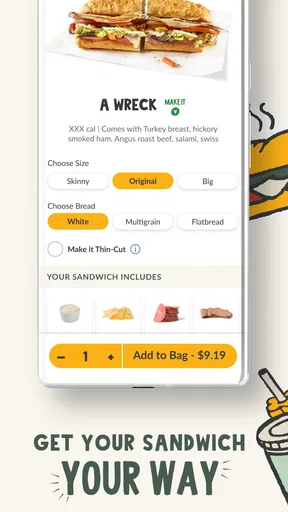
Yes, the app generally allows you to customize many menu items before adding them to your cart. Depending on the restaurant and item, you may be able to select ingredients, toppings, bread choices, sides, drinks, and other options. Availability can vary by location, and some requests may not be supported through the app, so review the final order carefully before submitting it.
Does Potbelly Sandwich Works offer delivery and pickup through the app?
Pickup is commonly available through participating Potbelly locations, while delivery availability depends on your address, local restaurant, operating hours, and current service coverage. The app should show the options offered in your area after you select a location. Estimated preparation or delivery times can change during busy periods, so confirm the displayed details before completing checkout.
Can I earn or use Potbelly Perks rewards in the app?
The app may connect with Potbelly’s customer loyalty program, allowing eligible users to sign in, earn rewards on qualifying purchases, and view or redeem available offers. Program rules, reward values, expiration dates, and qualifying items can change, so check the current terms shown in the app. Make sure you are logged into the correct account before ordering.
Is the Potbelly Sandwich Works app free, and what should I check before downloading it?
The Potbelly Sandwich Works app is generally free to download, although your mobile provider may apply data charges. Before installing, check that your device meets the required operating-system version and that you have enough storage space. You may also need location, notification, or account permissions for certain features. Menu prices, taxes, fees, and minimum order requirements can vary by location.
